Commands
(Redirected from In-Game Chat)
Jump to navigation
Jump to search
Commands are text-based instructions used to perform actions or access game features.
To execute a command from the list below, press Enter, type it, then press Enter again.
Contents
Chat
Precede your message with one of the following to send it to a specific global chat:
/gor.g(English)/ror.r(Russian)/ior.i(Italian)/dor.d(German)/eor.e(Spanish)/por.p(Polish)/cor.c(Czech/Slovak)/for.f(faction chat)
For example, pressing Enter to open the message bar, typing /d Guten Tag! and pressing Enter again will send your greeting to the German-only chat.
Precede your message with one of the following to customize it:
|
|
|
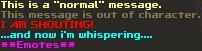
To emote, wrap your message in asterisks, as in: *drinks Nuka-Cola*.
Global chats can be (un)muted using the following commands:
~mutemutes the English global chat.~muterumutes the Russian global chat.~muteitmutes the Italian global chat.~mutedemutes the German global chat.~muteesmutes the Spanish global chat.~muteplmutes the Polish global chat.~muteczmutes the Czech/Slovak global chat.~unmuteunmutes all currently muted global chats.
~imnotanoobdontgivemetipsanymoreplsturns off chat tips.
Character / followers
~myinfodisplays your character's basic information: name, ID, account ID, day of birth.
~sortsorts the items currently in your inventory.
~combatmodedisplays your current default combat mode.~combatmode MODEchanges your default combat mode; replace MODE with one of the following:turnbased,tb,realtime,rt,both.
~traveltoggles the automatic cancellation of all optional random encounters.
~relicallows you to unequip your relic implant.
~autoperkchecktoggles gear perk selection window pop-ups.~perkcheckchecks if you have any available gear perks.
~ranksoverlays gear perk ranks on top of inventory icons of your armor/weapons.
~itemcolordisables the feature that colorizes gear based on the sum of its perk ranks.
~suicidekills your character and applies a 60-second revive cooldown to it.~eventsuicidecan be used to kill your character in some situations where~suicidedoes not work. If neither command works and you're stuck somewhere, you may need to request GM assistance.~rrlets you play Russian roulette if you have the .44 Magnum loaded with at least one round in your active slot.
~cb NUMBERdraws a blue "circle" around your character that spans the radius defined by the NUMBER you chose. Set the NUMBER to 0 to turn it off.
~checkblessshows your currently active blessing.~removeblessremoves your currently active blessing (which is necessary if you want to get a new one).
~awarenesstoggles the display of detailed character information on mouse hover. Note that this will not toggle the persistent overhead HP/name display: you will need to do this separately by pressing F6 (players) and F7 (NPCs).
~techallows characters with the Technician perk synergy to pick their extra perk.
~pvelets you conveniently select your PvE perks via a dialog window.
~showteamdisplays a full list of team members with basic information (name, HP, FoV) at the top of the screen.
~partypointsor~ppshows your currently used/maximum party points.
~setrespawnsets the base you are currently in as a respawn point for your companions.
~killpartykills your entire party. If you previously set a respawn point, your companions will respawn there eventually.
~disbandpartypermanently deletes all the NPC followers in your current party.
~disbandparty away_teampermanently deletes any NPC followers that are outside your current map (not location!). WARNING: If you mistype the command, such as by usingawayteaminstead ofaway_team, there is a risk that the regular~disbandpartycommand will be used instead and all of your followers will be deleted. Always double-check your spelling!
~traitlets you pick your new traits.
~linklets you perform weapon linking (Alien only).
~clonelets you spawn your clone (Clone only).
~infantryor~immunelets you select your immunity (Infantry only; you can't select the same immunity twice in a row).
~randomboyor~rblets you reroll your stats (Random Boy only).
Faction / base
~factioninfodisplays faction-related character information: the faction you are in, the factions that added you as a friend, and any pending faction invitations.
~factionnamesdisplays all active factions, including NPC factions.
~freefactionnamesor~ffnopens a webpage with a full list of currently available faction names in your default browser.
~invite nick_nameinvitesnick_nameto join your faction.
~accept faction_idlets you joinfaction_id.
~resignremoves you from your current faction.
~promote faction_memberincreases the faction rank offaction_memberby one.
~demote faction_memberdecreases the faction rank offaction_memberby one.
~kick faction_memberremovesfaction_memberfrom your faction.
~moveleadership faction_membertransfers the faction leader position tofaction_member.
~addbasetofaction base_nameconvertsbase_nameto a faction base. Base coordinates can be used instead of its name.
~baseinfodisplays a full list of online players who can see the base you are in on the world map.
~baseor~buildor~decorationor~engineopens the base management interface. Click this link for details.
~removeobjectallows you to delete all objects from a tile you have marked. It's mainly intended for exit decorations but can be used to delete regular items too. Works only inside bases that you can see on the world map. Note that the command cannot be used to remove cars or static scenery objects.
Account / meta
+requesthelp MESSAGErequests Game Master assistance. This should only be used for serious problems that cannot be solved any other way. ReplaceMESSAGEwith a concise description of the issue you're having.
~unlockcameraallows you to free the camera if it happens to get stuck on map blockers.
~testerallows you to skip Chapter 1 of the main quest. Note that this command is only enabled for the duration of season 6 and limited to one use per account.
~recallallows you to return to the respawn point during War Events/New Reno Wars.
~changepassword OldPassword NewPasswordchanges your account password. If your password contains spaces, replace them with asterisks, as in:my*pass*word.
~deleteself YourPassworddeletes the character that used the command once it disappears from the game (3 minutes after logging off). If you have spaces in your password, replace them with asterisks, as in:my*pass*word. The process can be canceled by repeating the command.
~namesrefreshes name colorization defined in NameColorizing.txt.
~timeoutstoggles on-screen cooldown display.
~patreon CODEactivates supporter benefits if you have a valid CODE.~patopens the Patreon menu (supporters only).
~exitexits the game.
