Difference between revisions of "Commands"
Jump to navigation
Jump to search
(Added ~unmutate/~fev) |
|||
| (22 intermediate revisions by 3 users not shown) | |||
| Line 1: | Line 1: | ||
| − | + | '''Commands''' are text-based instructions used to perform actions or access game features. | |
| + | To execute a command from the list below, press <code>Enter</code>, type it, then press <code>Enter</code> again. | ||
| − | == | + | == Chat == |
| − | |||
| − | |||
| − | |||
| − | |||
| − | |||
| − | |||
| − | + | Precede your message with one of the following to send it to a specific global chat: | |
| − | + | *<code>/g</code> or <code>.g</code> (English) | |
| + | *<code>/r</code> or <code>.r</code> (Russian) | ||
| + | *<code>/i</code> or <code>.i</code> (Italian) | ||
| + | *<code>/d</code> or <code>.d</code> (German) | ||
| + | *<code>/e</code> or <code>.e</code> (Spanish) | ||
| + | *<code>/p</code> or <code>.p</code> (Polish) | ||
| + | *<code>/c</code> or <code>.c</code> (Czech/Slovak) | ||
| + | *<code>/f</code> or <code>.f</code> (faction chat) | ||
| + | For example, pressing <code>Enter</code> to open the message bar, typing <code>/d Guten Tag!</code> and pressing <code>Enter</code> again will send your greeting to the German-only chat. | ||
| − | + | Precede your message with one of the following to customize it: | |
| − | + | {| style="border: none;" | |
| − | + | |- | |
| + | | style="vertical-align: top; padding-left: 0;" | | ||
| + | <div style="margin: 0; padding: 0; line-height: 1.2;"> | ||
| + | [[File:Chat message types.jpg|frameless|border|link=]] | ||
| + | <br> | ||
| + | <small>Various chat message types</small> | ||
| + | </div> | ||
| + | | style="vertical-align: top;" | | ||
| + | *<code>/o</code> or <code>.o</code> (out of character; for example, <code>/o What's the command for shouting?</code>) | ||
| + | *<code>/s</code> or <code>.s</code> (shout; visible to all the characters on your map rather than just the ones that can see you) | ||
| + | *<code>/w</code> or <code>.w</code> (whisper; visible only to characters in close proximity to you) | ||
| + | |} | ||
| − | * | + | To emote, wrap your message in asterisks, as in: <code>*drinks Nuka-Cola*</code>. |
| − | |||
| − | + | Global chats can be (un)muted using the following commands: | |
| − | |||
| − | |||
| − | * | + | *<code>~mute</code> mutes the English global chat. |
| − | + | *<code>~muteru</code> mutes the Russian global chat. | |
| + | *<code>~muteit</code> mutes the Italian global chat. | ||
| + | *<code>~mutede</code> mutes the German global chat. | ||
| + | *<code>~mutees</code> mutes the Spanish global chat. | ||
| + | *<code>~mutepl</code> mutes the Polish global chat. | ||
| + | *<code>~mutecz</code> mutes the Czech/Slovak global chat. | ||
| + | *<code>~unmute</code> unmutes all currently muted global chats. | ||
| − | * | + | *<code>~imnotanoobdontgivemetipsanymorepls</code> turns off chat tips. |
| − | |||
| − | |||
| − | == | + | == Character / followers == |
| − | |||
| − | |||
| − | * | + | *<code>~myinfo</code> displays your character's basic information: name, ID, account ID, day of birth. |
| − | |||
| − | * | + | *<code>~sort</code> sorts the items currently in your inventory. |
| − | |||
| − | * | + | *<code>~combatmode</code> displays your current default combat mode. |
| − | + | **<code>~combatmode MODE</code> changes your default combat mode; replace MODE with one of the following: <code>turnbased</code>, <code>tb</code>, <code>realtime</code>, <code>rt</code>, <code>both</code>. | |
| − | * | + | *<code>~travel</code> toggles the automatic cancellation of all optional random encounters. |
| − | |||
| − | |||
| + | *<code>~relic</code> allows you to unequip your [[relic implant]]. | ||
| − | + | *<code>~unmutate</code> or <code>~fev</code> allows you to unequip your [[mutations]]. | |
| − | * | ||
| − | |||
| − | + | *<code>~autoperkcheck</code> toggles gear perk selection window pop-ups. | |
| + | **<code>~perkcheck</code> checks if you have any available gear perks. | ||
| − | * | + | *<code>~resetperks</code> removes all perks from your max level [[armor]]/[[weapon]] and increases its [[item luck]]. |
| − | |||
| − | * | + | *<code>~ranks</code> overlays gear perk ranks on top of inventory icons of your armor/weapons. |
| − | |||
| − | * | + | *<code>~itemcolor</code> disables the feature that colorizes gear based on the sum of its perk ranks. |
| − | |||
| − | * | + | *<code>~suicide</code> kills your character and applies a 60-second revive cooldown to it. |
| − | + | **<code>~eventsuicide</code> can be used to kill your character in some situations where <code>~suicide</code> does not work. If neither command works and you're stuck somewhere, you may need to request GM assistance. | |
| − | + | **<code>~rr</code> lets you play Russian roulette if you have the [[.44 Magnum Revolver|.44 Magnum]] loaded with at least one round in your active slot. | |
| − | * | + | *<code>~cb NUMBER</code> draws a blue "circle" around your character that spans the radius defined by the NUMBER you chose. Set the NUMBER to 0 to turn it off. |
| − | |||
| − | * | + | *<code>~checkbless</code> shows your currently active blessing. |
| − | + | **<code>~removebless</code> removes your currently active blessing (which is necessary if you want to get a new one). | |
| − | * | + | *<code>~awareness</code> toggles the display of detailed character information on mouse hover. Note that this will not toggle the persistent overhead HP/name display: you will need to do this separately by pressing F6 (players) and F7 (NPCs). |
| − | |||
| − | * | + | *<code>~tech</code> allows characters with the [[Technician]] perk synergy to pick their extra perk. |
| − | < | ||
| − | + | *<code>~pve</code> lets you conveniently select your [[PvE perks]] via a dialog window. | |
| − | * | + | *<code>~showteam</code> displays a full list of team members with basic information (name, HP, FoV) at the top of the screen. |
| − | |||
| − | |||
| − | |||
| − | |||
| + | *<code>~partypoints</code> or <code>~pp</code> shows your currently used/maximum party points. | ||
| − | * | + | *<code>~setrespawn</code> sets the base you are currently in as a respawn point for your companions. |
| − | |||
| − | *'''~ | + | *<code>~killparty</code> kills your entire party. If you previously set a respawn point, your companions will respawn there eventually. |
| − | + | ||
| + | *<code>~disbandparty</code> permanently deletes all the NPC followers in your current party. | ||
| + | |||
| + | *<code>~disbandparty away_team</code> permanently deletes any NPC followers that are outside your current ''map'' (not location!). '''WARNING''': If you mistype the command, such as by using <code>awayteam</code> instead of <code>away_team</code>, there is a risk that the regular <code>~disbandparty</code> command will be used instead and all of your followers will be deleted. Always double-check your spelling! | ||
| + | |||
| + | === Class-related === | ||
| + | |||
| + | *<code>~trait</code> lets you pick your new [[trait]]s. | ||
| + | |||
| + | *<code>~leader</code> lets you select your desired [[Leader]] flag buff. | ||
| + | **<code>~leaderoff</code> turns off [[Leader]] flag bonuses. | ||
| + | |||
| + | *<code>~cmd</code> lets you access a menu with options specific to your class ([[Cyborg]] and [[Robot]] only). | ||
| + | |||
| + | *<code>~link</code> lets you perform weapon linking ([[Alien]] only). | ||
| + | |||
| + | *<code>~clone</code> lets you spawn your clone ([[Clone]] only). | ||
| + | |||
| + | *<code>~infantry</code> or <code>~immune</code> lets you select your immunity ([[Infantry]] only; you can't select the same immunity twice in a row). | ||
| + | |||
| + | *<code>~randomboy</code> or <code>~rb</code> lets you reroll your stats ([[Random Boy]] only). | ||
| + | |||
| + | == Faction / base == | ||
| + | |||
| + | *<code>~factioninfo</code> displays faction-related character information: the faction you are in, the factions that added you as a friend, and any pending faction invitations. | ||
| + | |||
| + | *<code>~factionnames</code> displays all active factions, including NPC factions. | ||
| + | |||
| + | *<code>~freefactionnames</code> or <code>~ffn</code> opens a webpage with a full list of currently available faction names in your default browser. | ||
| + | |||
| + | *<code>~invite nick_name</code> invites <code>nick_name</code> to join your faction. | ||
| + | |||
| + | *<code>~accept faction_id</code> lets you join <code>faction_id</code>. | ||
| + | |||
| + | *<code>~resign</code> removes you from your current faction. | ||
| + | |||
| + | *<code>~promote faction_member</code> increases the faction rank of <code>faction_member</code> by one. | ||
| + | |||
| + | *<code>~demote faction_member</code> decreases the faction rank of <code>faction_member</code> by one. | ||
| + | |||
| + | *<code>~kick faction_member</code> removes <code>faction_member</code> from your faction. | ||
| + | |||
| + | *<code>~moveleadership faction_member</code> transfers the faction leader position to <code>faction_member</code>. | ||
| + | |||
| + | *<code>~addbasetofaction base_name</code> converts <code>base_name</code> to a faction base. Base coordinates can be used instead of its name. | ||
| + | |||
| + | *<code>~baseinfo</code> displays a full list of online players who can see the base you are in on the world map. | ||
| + | |||
| + | *<code>~base</code> or <code>~build</code> or <code>~decoration</code> or <code>~engine</code> opens the base management interface. Click <u>[[Bases#Base_management|this link]]</u> for details. | ||
| + | |||
| + | *<code>~removeobject</code> allows you to delete all objects from a tile you have <u>[[Bases#Mark|marked]]</u>. It's mainly intended for exit decorations but can be used to delete regular items too. Works only inside bases that you can see on the world map. Note that the command cannot be used to remove cars or static scenery objects. | ||
| + | |||
| + | == Account / meta == | ||
| + | |||
| + | *<code>+requesthelp MESSAGE</code> requests Game Master assistance. This should <u>only</u> be used for serious problems that cannot be solved any other way. Replace <code>MESSAGE</code> with a concise description of the issue you're having. | ||
| + | |||
| + | *<code>~unlockcamera</code> allows you to free the camera if it happens to get stuck on map blockers. | ||
| + | |||
| + | *<code>~tester</code> allows you to skip [[Chapter 1]] of the main quest. Note that this command is only enabled for the duration of season 6 and limited to one use per account. | ||
| + | |||
| + | *<code>~recall</code> allows you to return to the respawn point during [[War Event]]s/[[New Reno Wars]]. | ||
| + | |||
| + | *<code>~reroll</code> allows you to remake your character without losing its level progression; see the [[Reroll]] article for details. | ||
| + | |||
| + | *<code>~changepassword OldPassword NewPassword</code> changes your account password. If your password contains spaces, replace them with asterisks, as in: <code>my*pass*word</code>. | ||
| + | |||
| + | *<code>~names</code> refreshes name colorization defined in NameColorizing.txt. | ||
| + | |||
| + | *<code>~timeouts</code> toggles on-screen [[cooldown]] display. | ||
| + | |||
| + | *<code>~patreon CODE</code> activates supporter benefits if you have a valid CODE. | ||
| + | **<code>~pat</code> opens the Patreon menu (supporters only). | ||
| + | |||
| + | *<code>~exit</code> exits the game. | ||
== See also == | == See also == | ||
| − | + | ||
*[[Shortcuts]] | *[[Shortcuts]] | ||
[[Category:Guides]] | [[Category:Guides]] | ||
Latest revision as of 22:20, 24 June 2026
Commands are text-based instructions used to perform actions or access game features.
To execute a command from the list below, press Enter, type it, then press Enter again.
Contents
Chat
Precede your message with one of the following to send it to a specific global chat:
/gor.g(English)/ror.r(Russian)/ior.i(Italian)/dor.d(German)/eor.e(Spanish)/por.p(Polish)/cor.c(Czech/Slovak)/for.f(faction chat)
For example, pressing Enter to open the message bar, typing /d Guten Tag! and pressing Enter again will send your greeting to the German-only chat.
Precede your message with one of the following to customize it:
|
|
|
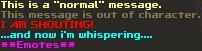
To emote, wrap your message in asterisks, as in: *drinks Nuka-Cola*.
Global chats can be (un)muted using the following commands:
~mutemutes the English global chat.~muterumutes the Russian global chat.~muteitmutes the Italian global chat.~mutedemutes the German global chat.~muteesmutes the Spanish global chat.~muteplmutes the Polish global chat.~muteczmutes the Czech/Slovak global chat.~unmuteunmutes all currently muted global chats.
~imnotanoobdontgivemetipsanymoreplsturns off chat tips.
Character / followers
~myinfodisplays your character's basic information: name, ID, account ID, day of birth.
~sortsorts the items currently in your inventory.
~combatmodedisplays your current default combat mode.~combatmode MODEchanges your default combat mode; replace MODE with one of the following:turnbased,tb,realtime,rt,both.
~traveltoggles the automatic cancellation of all optional random encounters.
~relicallows you to unequip your relic implant.
~unmutateor~fevallows you to unequip your mutations.
~autoperkchecktoggles gear perk selection window pop-ups.~perkcheckchecks if you have any available gear perks.
~ranksoverlays gear perk ranks on top of inventory icons of your armor/weapons.
~itemcolordisables the feature that colorizes gear based on the sum of its perk ranks.
~suicidekills your character and applies a 60-second revive cooldown to it.~eventsuicidecan be used to kill your character in some situations where~suicidedoes not work. If neither command works and you're stuck somewhere, you may need to request GM assistance.~rrlets you play Russian roulette if you have the .44 Magnum loaded with at least one round in your active slot.
~cb NUMBERdraws a blue "circle" around your character that spans the radius defined by the NUMBER you chose. Set the NUMBER to 0 to turn it off.
~checkblessshows your currently active blessing.~removeblessremoves your currently active blessing (which is necessary if you want to get a new one).
~awarenesstoggles the display of detailed character information on mouse hover. Note that this will not toggle the persistent overhead HP/name display: you will need to do this separately by pressing F6 (players) and F7 (NPCs).
~techallows characters with the Technician perk synergy to pick their extra perk.
~pvelets you conveniently select your PvE perks via a dialog window.
~showteamdisplays a full list of team members with basic information (name, HP, FoV) at the top of the screen.
~partypointsor~ppshows your currently used/maximum party points.
~setrespawnsets the base you are currently in as a respawn point for your companions.
~killpartykills your entire party. If you previously set a respawn point, your companions will respawn there eventually.
~disbandpartypermanently deletes all the NPC followers in your current party.
~disbandparty away_teampermanently deletes any NPC followers that are outside your current map (not location!). WARNING: If you mistype the command, such as by usingawayteaminstead ofaway_team, there is a risk that the regular~disbandpartycommand will be used instead and all of your followers will be deleted. Always double-check your spelling!
~traitlets you pick your new traits.
~linklets you perform weapon linking (Alien only).
~clonelets you spawn your clone (Clone only).
~infantryor~immunelets you select your immunity (Infantry only; you can't select the same immunity twice in a row).
~randomboyor~rblets you reroll your stats (Random Boy only).
Faction / base
~factioninfodisplays faction-related character information: the faction you are in, the factions that added you as a friend, and any pending faction invitations.
~factionnamesdisplays all active factions, including NPC factions.
~freefactionnamesor~ffnopens a webpage with a full list of currently available faction names in your default browser.
~invite nick_nameinvitesnick_nameto join your faction.
~accept faction_idlets you joinfaction_id.
~resignremoves you from your current faction.
~promote faction_memberincreases the faction rank offaction_memberby one.
~demote faction_memberdecreases the faction rank offaction_memberby one.
~kick faction_memberremovesfaction_memberfrom your faction.
~moveleadership faction_membertransfers the faction leader position tofaction_member.
~addbasetofaction base_nameconvertsbase_nameto a faction base. Base coordinates can be used instead of its name.
~baseinfodisplays a full list of online players who can see the base you are in on the world map.
~baseor~buildor~decorationor~engineopens the base management interface. Click this link for details.
~removeobjectallows you to delete all objects from a tile you have marked. It's mainly intended for exit decorations but can be used to delete regular items too. Works only inside bases that you can see on the world map. Note that the command cannot be used to remove cars or static scenery objects.
Account / meta
+requesthelp MESSAGErequests Game Master assistance. This should only be used for serious problems that cannot be solved any other way. ReplaceMESSAGEwith a concise description of the issue you're having.
~unlockcameraallows you to free the camera if it happens to get stuck on map blockers.
~testerallows you to skip Chapter 1 of the main quest. Note that this command is only enabled for the duration of season 6 and limited to one use per account.
~recallallows you to return to the respawn point during War Events/New Reno Wars.
~rerollallows you to remake your character without losing its level progression; see the Reroll article for details.
~changepassword OldPassword NewPasswordchanges your account password. If your password contains spaces, replace them with asterisks, as in:my*pass*word.
~namesrefreshes name colorization defined in NameColorizing.txt.
~timeoutstoggles on-screen cooldown display.
~patreon CODEactivates supporter benefits if you have a valid CODE.~patopens the Patreon menu (supporters only).
~exitexits the game.
